
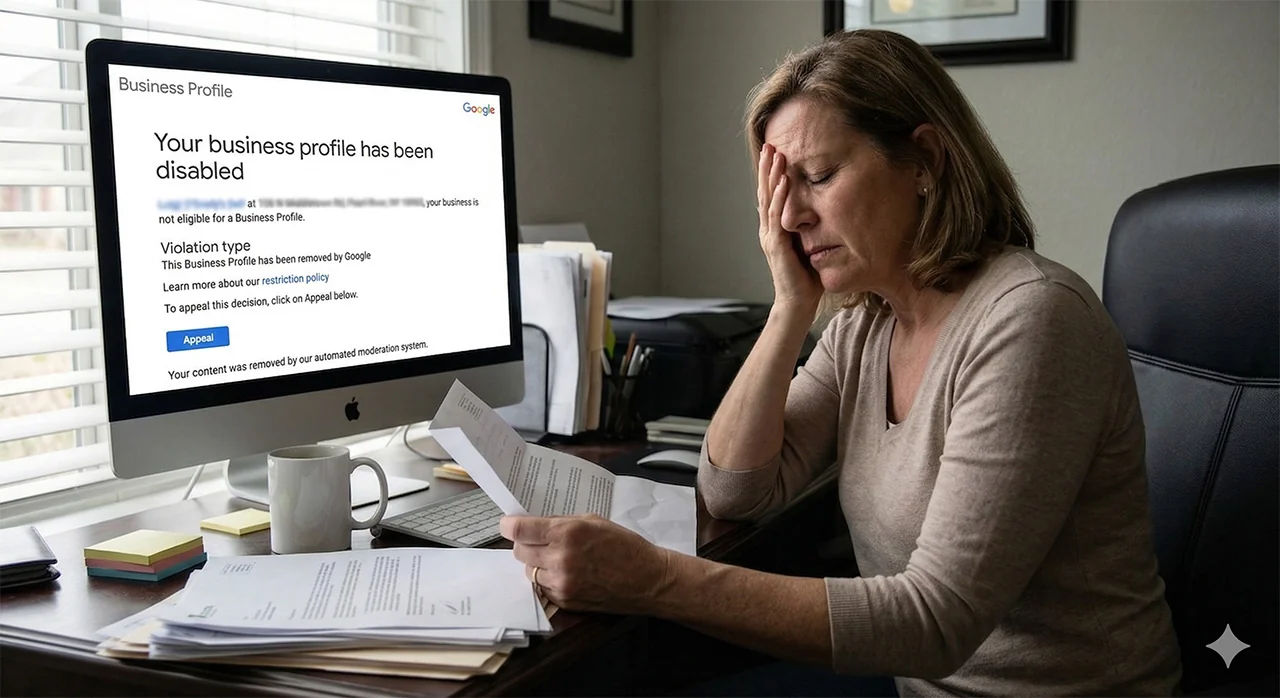
Our client logged on one day to a message from Google that said: “Your profile has been disabled.”
Odd – they hadn’t made any recent changes, and the profile had been up and running for more than 10 years with no problems.
What happened, and how did we fix it for them?
Google Business Profile Keeps Getting Suspended, with Google stating the “business profile doesn’t exist.”
The email from Google was neither very long nor very helpful. It included the following info:
- The name and address of the business to confirm this is your profile
- The statement “your business is not eligible for a Business Profile”
- A short summary of the violation type, with a link to their restriction policy
- A button that lets you appeal the suspension
- The note “Your content was removed by our automated moderation system”
Our client immediately appealed; their appeal was approved shortly after, and their profile went live again. However, a few days later, their profile was disabled again. This happened seven different times over two months before they hired us.
They were, understandably, very frustrated.
“Our business was severely impacted by our business listing being disabled by Google. We noticed a dramatic decrease in call in orders, and on-line orders in the time we were down. And our catering orders were also impacted as well.” – Michelle, Owner
Google Business Profile Audit: What Went Wrong?
First, we needed information.
We performed a comprehensive audit of our client’s Google Business Profile and NAP (name, address, phone number) information on other websites. We also cross-referenced any official documentation they were able to provide (business registration, licenses, utility bills, etc.).
In this process, we identified multiple potential issues that would lead to repeated suspensions. Namely, there was a small issue with the spelling of their address.
Second, we analyzed Google’s clues.
When Google suspends a Google Business Profile, a Google Ads account, or other account, they will not tell you exactly what is wrong or how to fix it. This is to prevent bad actors from gaming the system, but it’s annoying for genuine businesses that rely on GBP for foot traffic & revenue.
However, Google does give hints in a few different places. In this case, we carefully reviewed the restriction policy linked in their email and the wording of the disapproval wherever it was mentioned.
We knew what to look for, but trying to work through all the nuances of the appeals process can be discouraging (to put it mildly) when you aren’t sure where to start. According to our client:
“The appeals process was difficult to navigate on our own. We opened a Google ticket and still had no luck as well. We followed all the advice from Google on what to look for to correct the issue but every time the appeal was won and they re-instated the page, it was taken back down within 24 hours again. It was extremely frustrating.” – Michelle, Owner
Since the restriction policy linked to the “business does not exist” section and the appeals status said “Business Profile doesn’t exist”, we focused on that. Here is Google’s exact language:
To keep data on Google as accurate as possible, Google uses information from different sources such as user reports and licensed content.
If we determine that your business doesn’t exist in the location you claim, Google will disable your profile.
This may sound vague, but we have spent years dealing with Google’s suspension and appeals systems. Compared to other issues we’ve appealed, this seemed wonderfully straightforward.
Third, we formulated a plan of attack.
Our client had already gone through multiple rounds of appeals & suspensions. We knew they were fed up with the process. Our goal was to get as much information, documentation, and evidence as possible up front so we could do our job while our client focused on other things.
We created a multi-step plan that addressed the most likely culprit (the address mismatch) first. Since Google doesn’t tell you the exact problem or solution, we also had a few backup options in case we were off the mark.
Google Business Profile Appeal: What Worked?
Luckily, we were able to get their profile back up permanently on the first try. So what happened?
Based on the clues above, we determined this was likely an issue with Google’s automated system checks. Check out these two addresses:
- 200 North Main Street
- 200 N Main St
To us humans, these addresses are exactly the same. The post office will send mail to the same place either way. That’s why our client’s appeals were approved every time a human reviewed their profile.
To Google’s automated system (i.e. robots), these addresses do not match. The difference in spelling would trigger an automatic suspension whenever Google’s bots reviewed the profile.
Our client entered address #1 when they created their GBP years ago – this was acceptable for more than a decade. Google has been shifting to more automated processes over the last few years. It’s likely that only address #2 existed in its database, and it could not accommodate the slight variation in its automated checks.
We were happy to have finally fixed such a persistent problem.
“Barrel Roll took the issue right out of our hands,” our client said. “They needed very little from us to get the process started. It was such a relief to us knowing that someone was focusing on this issue and we could get back to focusing on our business.” – Michelle, Owner
What Can You Do?
Make sure your Google Business Profile address EXACTLY matches how Google displays the address in Google Maps.
If you’re having the same issue as our client, this should help prevent your profile from being automatically suspended by the automated review system. If that doesn’t work, we may be able to help! Fill in the form below to get started.
Looking for help with your suspended Google Business Profile?
Fill out the form below and we’ll be in touch!